Using the Vox Axis Desktop Workbench & Loquela Controls
The Vox Axis Desktop Workbench (vox-gui, published at vox-foundation/vox-axis) is a native Tauri 2 operator console and spatial codebase simulator uniting multi-agent chat (Loquela), the VRBS ROMA 3D/2.5D isometric workspace simulator, the AQVAEDUCTUS 3-tier hydraulic verification cascade, an interactive Documentation & Findings Reader (DocReader), and live telemetry across 32 catalog-generated surfaces under an enforced 4-profile WCAG theme contract.
vox-foundation/vox-axis) — Cycling through the VRBS ROMA Codebase Simulator, Imperium Prefecture Blast-Radius Inspector, Mission Control, Multi-Dock Chat, AQVAEDUCTUS 3-Tier Hydraulic Verification Cascade, MENS Corpus Studio, and the Enforced Theme Contract (Imperial Carrara White & Gold vs. Minimalist Grey-Blue Slate).
Architecture & Workbench Layout
Section titled “Architecture & Workbench Layout”Diagram source
graph { direction: right node omnibar: "Omnibar (Cmd/Ctrl+K)\nFederated Search & Slash Router" node dock: "DockWorkspaceShell\nMulti-Panel Split Docking" node loquela: "Loquela Chat & Posture Bar\n(Alt+1..4 Clutch & Risk Knobs)" node reader: "DocReader & Scientia\n(Pinned Architecture + RRF Search)" node rail: "ChatExecutionRail\n(Turn Receipts & CAS Task Ledger)" omnibar -> dock dock -> loquela dock -> reader dock -> rail}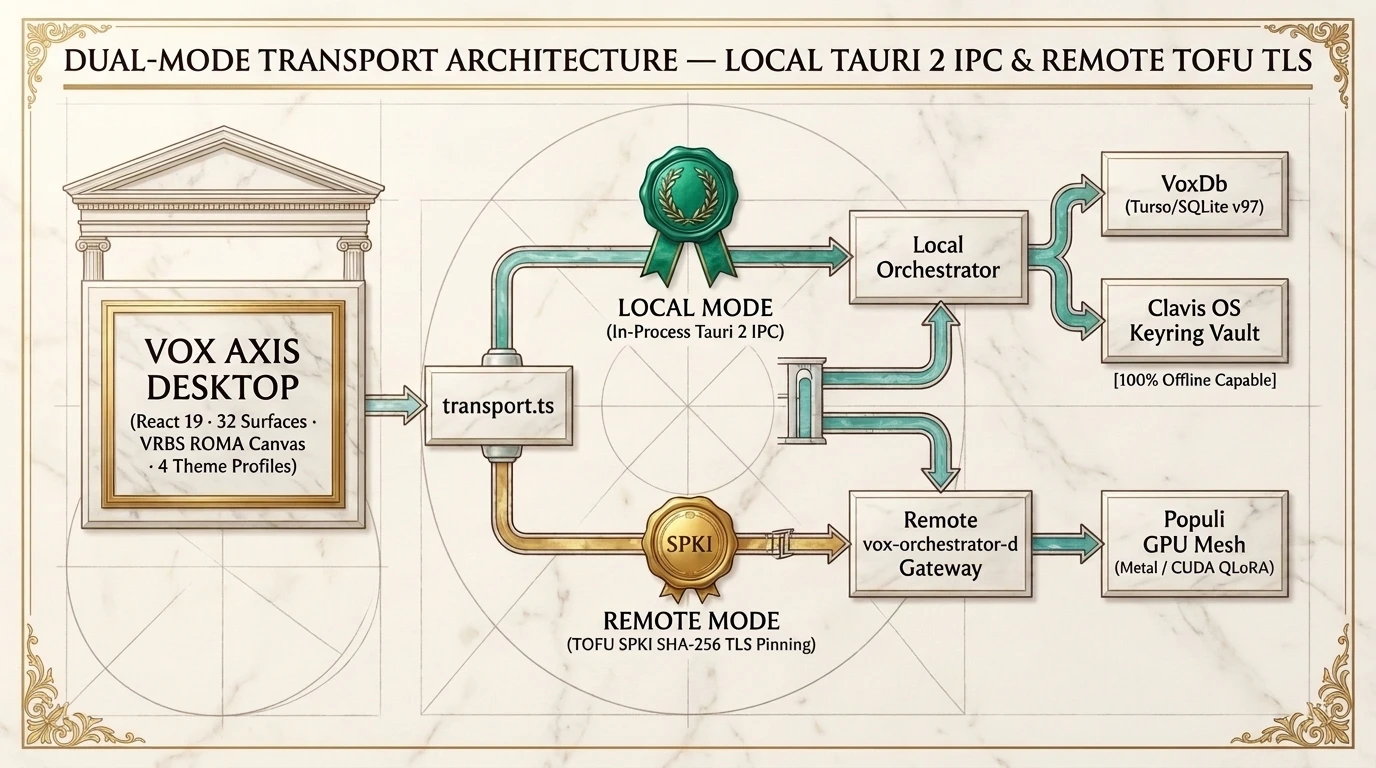
transport.ts) — Runs 100% offline in Local Mode over in-process Tauri 2 IPC against local VoxDb (v97) and Clavis, or connects in Remote Mode over TOFU SPKI SHA-256 pinned TLS to vox-orchestrator-d.
1. Launching the Workbench
Section titled “1. Launching the Workbench”Run the desktop shell from the workspace root or launch via the vox CLI:
cargo run -p vox-cli --features gui -- guiUse Cmd+K (macOS) or Ctrl+K (Windows/Linux) at any time to open the Universal Capability Palette and jump across all 32 registered surfaces organized into 5 domains:
- Operate (11 views):
dashboard,chat,tasks,sub-agents,flow,mesh,runs,needs-you,approvals,policies,mercatus - Develop (8 views):
console,catalog,skills,harness(AQVAEDUCTUS),harness-health,repository,browser,coderabbit - Knowledge & Socrates Gate (6 views):
vox-search,memory,activity,research,scientia,publications - Compute / MENS (4 views):
mens,models,populi,oratio - System &
VRBS ROMA(3 views):settings,explorer,gamify(VRBS ROMASimulator)
For a complete screen-by-screen visual reference of all 32 views, see the vox-foundation/vox-axis README.
2. Exploring VRBS ROMA & the AQVAEDUCTUS Verification Cascade
Section titled “2. Exploring VRBS ROMA & the AQVAEDUCTUS Verification Cascade”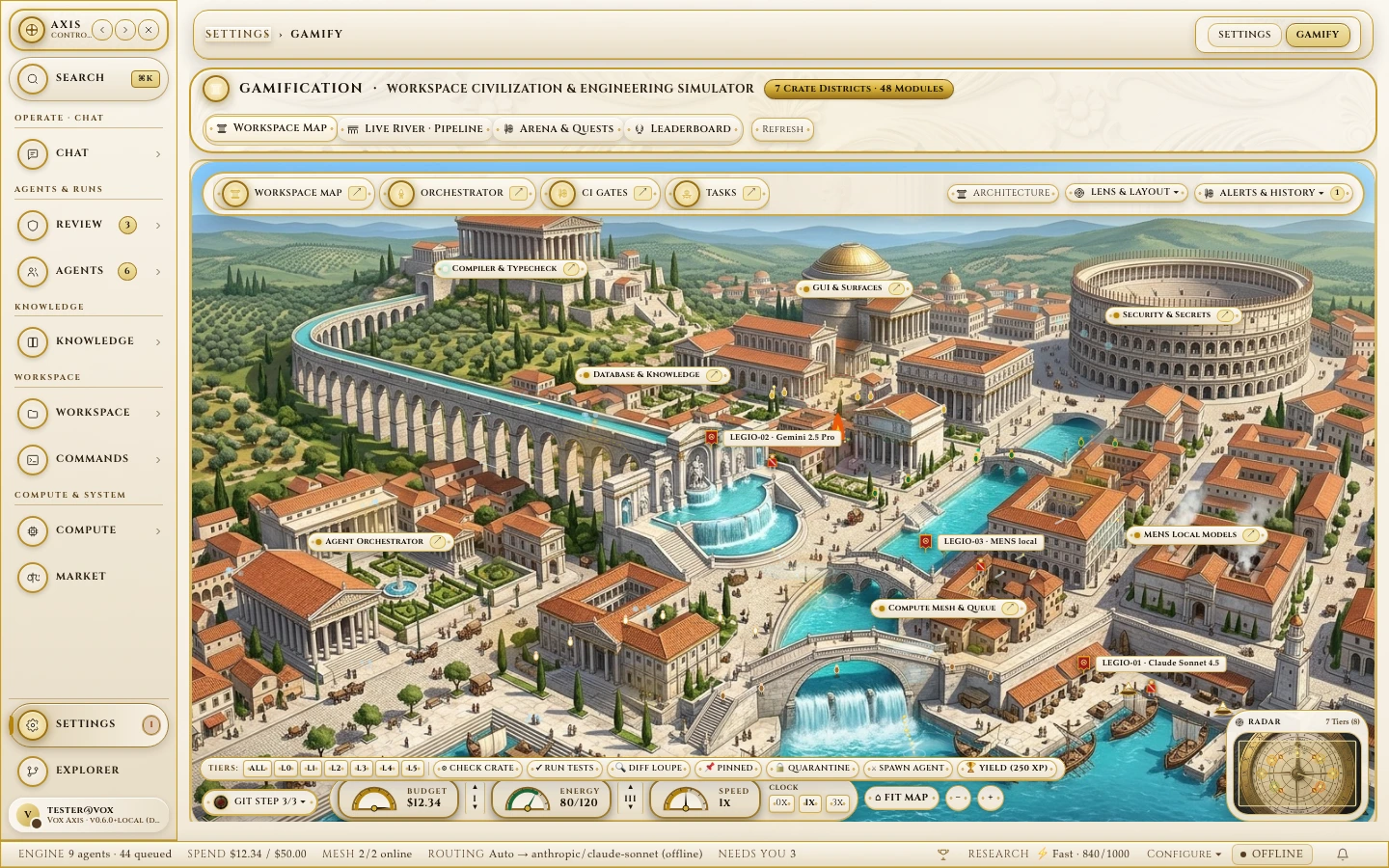
Isometric Codebase Metropolis & Forma Urbis Radar
Computes Kahn topological layers (L0–L5) and Tarjan SCCs across Cargo, TypeScript, Python, and Go workspaces, inflating high-churn districts while LEGIO magistrate agents patrol active crate roads.
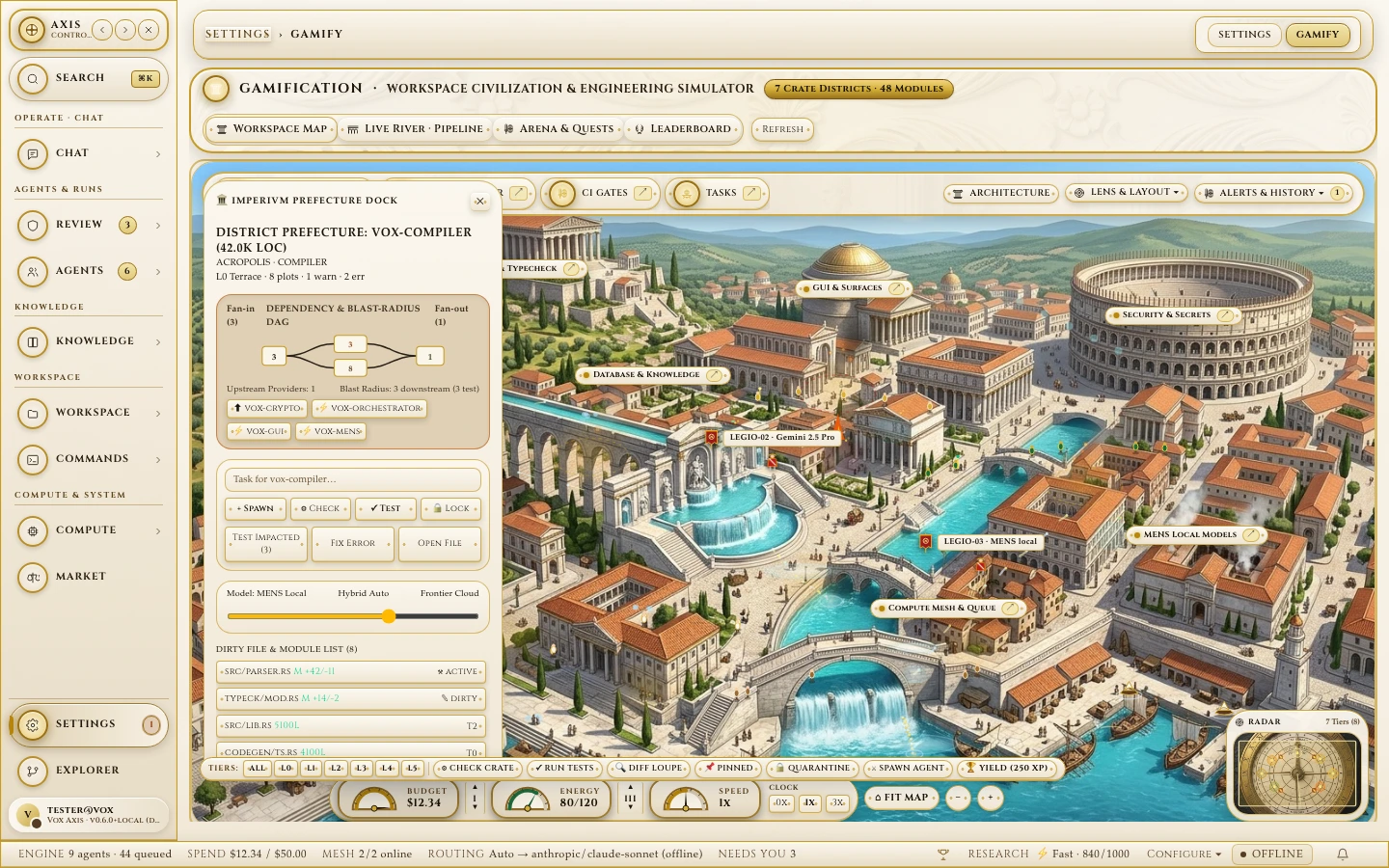
Imperium Blast-Radius DAG Inspector
Click any monument to inspect upstream providers, downstream blast radius, per-file +LoC / -LoC diff slabs, and 1-click [CHECK], [✓ TEST], and [TEST IMPACTED] actions.
3. Real-Time Loquela Posture Controls & Keybinds
Section titled “3. Real-Time Loquela Posture Controls & Keybinds”The Loquela control bar (crates/vox-gui/ui/src/components/surfaces/Loquela/Loquela.tsx) lets you steer how the agent harness routes models, compacts context, and verifies code on every turn:
| Shortcut | Control | Effect on Agent Turn |
|---|---|---|
Alt+1 .. Alt+4 | Cognitive Clutch | Switches between Fast Local (MENS), Balanced Hybrid, Deep Architecture, and Speculative Repair Cascade. |
Alt+R | Risk Posture | Cycles Conservative, Balanced, and Autonomous tool approval boundaries. |
Alt+C | Compaction Strategy | Switches cl100k_base BPE token budgeting (2,400 / 4,000 / 8,000 tokens with 20% goal-anchor preservation). |
Alt+/ | Keybind HUD Overlay | Toggles the live shortcut reference overlay (loquela-keybind-hud-panel). |
4. Switching Between the 4 Enforced WCAG Theme Profiles
Section titled “4. Switching Between the 4 Enforced WCAG Theme Profiles”Open Settings → Theme Contract (settings) to switch live between the 4 Style-Dictionary-generated theme profiles (enforced by vox-code-audit detector vox/ui/theme-contract-drift and the unified 4-token font contract --font-display, --font-serif, --font-sans, --font-mono):
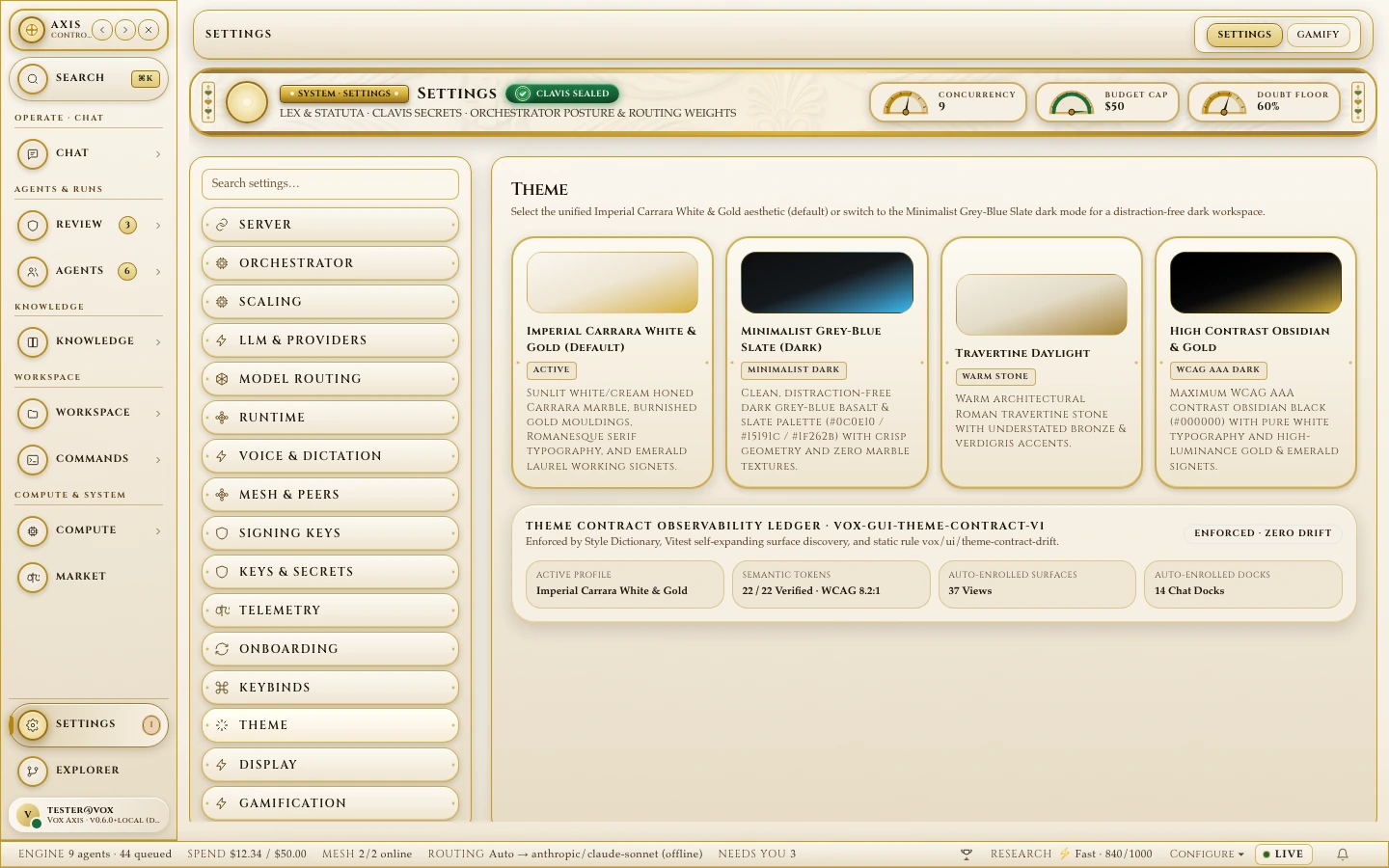
Imperial Carrara White & Gold (Default)
Sunlit honed Carrara marble (#FAF6EE), burnished gold mouldings (#C59B27), deep espresso ink (#1C140C), and emerald laurel signets (#1B6B3A).
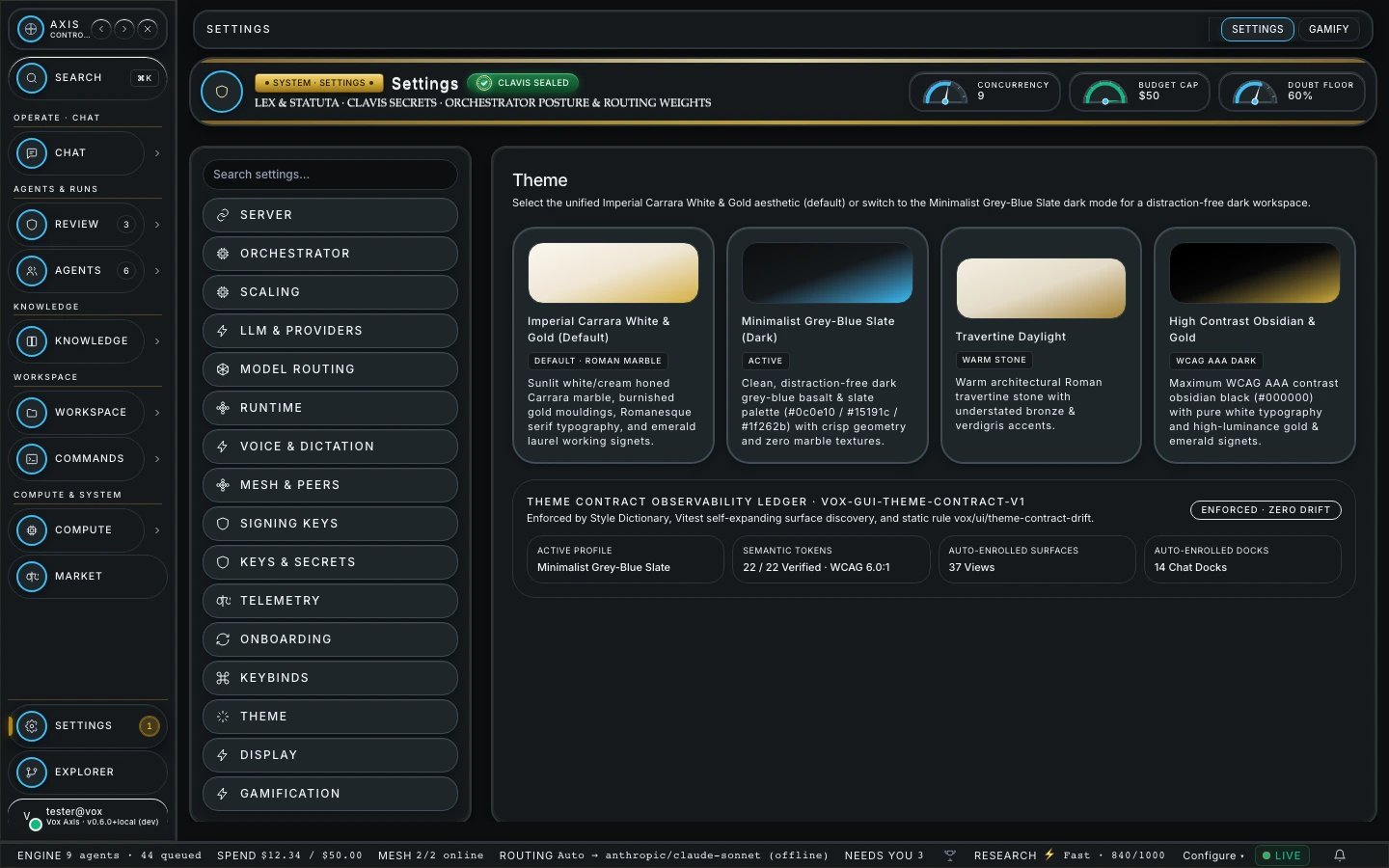
Minimalist Grey-Blue Slate & WCAG AAA
Basalt/slate dark palette (#0c0e10 / #15191c / #1f262b), crisp Inter + tabular monospace geometry, and zero marble textures.
5. Exposing Project Tools to the Workbench
Section titled “5. Exposing Project Tools to the Workbench”Any tool or resource declared in your .vox files is automatically discoverable in the workbench capability registry:
table DeploymentTarget {    env_name: str    healthy:  bool}
query healthy_targets() to int {    return len(db.DeploymentTarget.all())}
tool "Check deployment target health from the Axis Workbench" check_target(env_name: str) to Result[str] {    return Ok("Target verified: " + env_name + " (" + str(healthy_targets()) + " active)")}
6. Using the Built-In Documentation & Findings Reader (DocReader)
Section titled “6. Using the Built-In Documentation & Findings Reader (DocReader)”Open the Documentation Reader (DocReader.tsx) from the sidebar or Omnibar to:
- Jump directly to Pinned Core Architecture Guides (
Where Things Live,5-Minute Quickstart,Subsystem Architecture Atlas L0–L5,AgentOS & Orchestrator SSOT). - Filter the knowledge base by Topic and Domain pill selectors using hybrid Tantivy BM25 + HNSW Reciprocal Rank Fusion (RRF).
- Review candidate research findings in the Findings Inbox and promote verified
[path:Lstart-Lend]claims through the 5-stage Socrates gate.